# Help with transition to New Tagtool
**URL:** https://www.tagtool.org/t/help-with-transition-to-new-tagtool/484
**Category:** Support
**Tags:** ipad
**Created:** [October 7, 2017, 4:29am UTC](https://www.tagtool.org/t/help-with-transition-to-new-tagtool/484 "2017-10-07T04:29:51Z")
**Posts on this page:** 8
**Page:** 1
### Author:  [@projectedvisions](https://www.tagtool.org/u/projectedvisions)
#### Post date: [October 7, 2017, 4:29am UTC](https://www.tagtool.org/t/help-with-transition-to-new-tagtool/484/1 "2017-10-07T04:29:52Z")
Haven’t had much time to work in the new tagtool but really been enjoying the import photo feature and scratching features, at any rate I had a few questions:
- Animating - Is it still possible to trigger speed adjustment, and the infinite looping animations of rotate, zoom and horizontal and vertical scrolling in the New Tagtool? If so how? Am I missing something?
- App Update - Like others I wish to keep both versions of tagtool on my iPad. To make clear updating to ios11 older tagtool won’t work? What’s the best solution for having both versions of tagtool, if you don’t personally update the iOS?
Thanks!
RPG
---
### Author:  [@maki](https://www.tagtool.org/u/maki)
#### Post date: [October 7, 2017, 6:23pm UTC](https://www.tagtool.org/t/help-with-transition-to-new-tagtool/484/2 "2017-10-07T18:23:23Z")
HI @projectedvisions
> Is it still possible to trigger speed adjustment
yes, slide two fingers left/right over the loop bar to control speed
> and the infinite looping animations of rotate, zoom and horizontal and vertical scrolling
Rotate and horizontal/vertical translation is possible. Scale will be added in a future update.
- Put 2 fingers on the Record button
- For translation, use your other hand to slide one finger in the workspace horizontally or vertically (while still holding the 2 fingers on the rec button)
- For rotation: use your other hand to twist 2 fingers in the workspace (while still holding the 2 fingers on the rec button)
If you explore the interface in Learn Mode, you can see instructions for these and other functions.
> App Update - Like others I wish to keep both versions of tagtool on my iPad. To make clear updating to ios11 older tagtool won’t work? What’s the best solution for having both versions of tagtool, if you don’t personally update the iOS?
Yes, the old app won’t work with iOS 11 and will not be updated. In any case, we recommend sticking with iOS10 for now even for the new app while iOS11 hopefully matures.
If you are on iOS 10, you can have both apps side by side without any problem!
---
### Author:  [@projectedvisions](https://www.tagtool.org/u/projectedvisions)
#### Post date: [October 7, 2017, 7:29pm UTC](https://www.tagtool.org/t/help-with-transition-to-new-tagtool/484/3 "2017-10-07T19:29:43Z")
Hey @maki
Awesome, thanks for explaining! Didn’t catch the learn mode feature before.
That’s clear on the iOS situation. Let’s say I want to update the new tagtool, how do you do that and keep both versions of tagtool still? If I go to the iTunes app store to update will it overwrite the older tagtool?
Cheers,
RPG
---
### Author:  [@maki](https://www.tagtool.org/u/maki)
#### Post date: [October 7, 2017, 7:52pm UTC](https://www.tagtool.org/t/help-with-transition-to-new-tagtool/484/4 "2017-10-07T19:52:22Z")
We created the new one as a separate app, so it won’t overwrite the old one!
---
### Author:  [@projectedvisions](https://www.tagtool.org/u/projectedvisions)
#### Post date: [October 7, 2017, 8:08pm UTC](https://www.tagtool.org/t/help-with-transition-to-new-tagtool/484/5 "2017-10-07T20:08:55Z")
Rad! You guys got it covered. 🕶
---
### Author:  [@vector](https://www.tagtool.org/u/vector)
#### Post date: [November 26, 2017, 6:54pm UTC](https://www.tagtool.org/t/help-with-transition-to-new-tagtool/484/6 "2017-11-26T18:54:13Z")
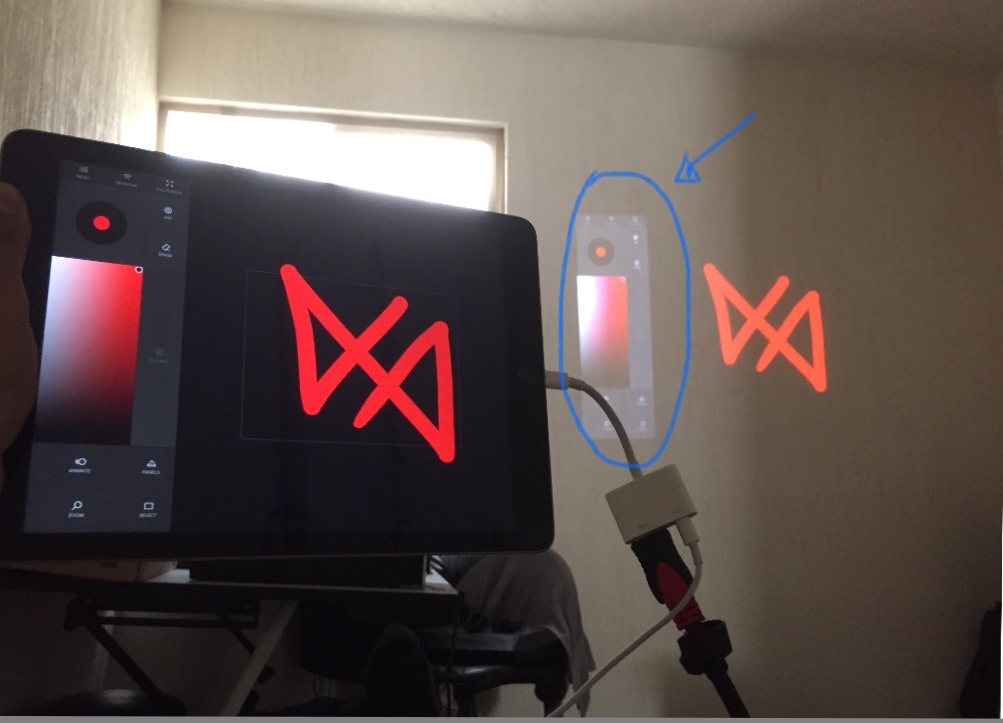
finally change my ipad 2 to ipad 5, to use the new version of tagtool, I do not understand why when you connect it to the projector the whole application is displayed, help
---
### Author:  [@iink](https://www.tagtool.org/u/iink)
#### Post date: [November 27, 2017, 10:47pm UTC](https://www.tagtool.org/t/help-with-transition-to-new-tagtool/484/7 "2017-11-27T22:47:13Z")
@vector
The recent iOS 11 has issues with connecting the external display. Usually it works for the first time - but when you disconnect and try to reconnect you get a mirrored signal instead of the workspace. Restarting the app helps.
We are in contact with Apple and Unity about these problems.
Thx for your patience.
mat
---
### Author:  [@vector](https://www.tagtool.org/u/vector)
#### Post date: [November 28, 2017, 1:10am UTC](https://www.tagtool.org/t/help-with-transition-to-new-tagtool/484/8 "2017-11-28T01:10:39Z")
Thanks, I’ll wait for the update